Sunday, 5 August 2018

Spring Boot - OAuth2

  • http://javainuse.com/spring/spring-boot-oauth-authorization-code

Thursday, 19 October 2017

1.     What's New in JDK 8
a.      Lambda Expressions
b.      Functional Interfaces
c.       Default methods                                                            
d.      Static Methods
e.      Method Reference and Constructor reference using double column operator(::)
f.        Stream API
g.      Date and Time API(Joda API)
2.     Purpose of Java 8
a.      To  simplify programming
                                                              i.      Less code
                                                            ii.      Maintainable
                                                          iii.      Readable
b.      To get the benefits of the functional program in java, Java uses lambda expressions.
c.       To enable parallel processing

3.      Lambda expressions
a.      Lambda expressions are methods which are do not belong to a class. They are just functions exist in isolation and that function can be treated as values.
b.      Functions as Values
                                                              i.      Normally, We can assign a string or any objects into a variable.
                                                            ii.      Lambda expression is  a method which has assigned to a variable. If we are assigning we do not need other method signature. So the lambda expression signature will be like below code,
aVariable = ()-> {System.out.println("HIIII");}
                                                          iii.      Lambada expressions with parameters.
lambdaWithParamater = (int x)->{x= x+}
c.       Steps to create Lambda Expression Java
                                                              i.      Create an Interface with abstract method having the same signature of the lambda function and use it as the type for lambda expression variable. This interface must have only one method.
                                                            ii.      To run this action, call method in the interface.
                                                          iii.      Its just like implementation of singe function.
public interface LambdaType {
     void foo();
public static void main(String[] args) {   
LambdaType myLambmadaVoidNoParam = ()->{System.out.println("HIII");};
myLambmadaVoidNoParam.foo();     
   }
d.      Lambda Examples
e.      Why lambda expressions ?
                                                              i.      We are using lambda expression to enable functional programming in java.
                                                            ii.      To write more readable, maintainable and clean less code.
                                                          iii.      To use apis very easily effectively.
                                                           iv.      To enable processing also
4.     Function Interface
a.      Java.util.function has special interface like bleow, it contains generic methods used as type for lambda expression wirh same type and signature.
                                                              i.      Predecate Interface
1.      It is already having boolean method. So whenever we need a lambda expression with Boolean return type use Predicate as  type. No nned to create another interface.
2.      Lot of other interfaces available like this.

5.     Streams
List.stream().filter(student->getName().startWith(“C”)).foreach(p->System.out.println(p.getName())).

a.      Stream consists of 3 main elements
                                                              i.      Source
1.      Collection
                                                            ii.      Operations
1.      Filter(), used to give condition
                                                          iii.      end operations
1.      count()
b.      More succinct code, sometimes just one liner
c.       You can pass lambda expression, which gives you the immense flexibility to change what you do in the loop.
d.      .parallel() can be used for parallel operations.
e.       ForEach looping can be made parallel with minimal effort e.g. without writing a single line of concurrent code, all you need to do is call parallelStream() method. 
f.         forEach() method is defined at two places, on Iterable interface as well as on Stream class. which means list.forEach() and list.stream.forEach() both are valid.
g.      Prefer using forEach() with streams because streams are lazy and not evaluated until a terminal operation is called. 
h.      forEach() is a terminal operation, you cannot call any method on stream after this.
i.        When you run forEach() method on parallel stream the order on which elements are processed is not guaranteed, though you can use forEachOrdered() to impose ordering.
j.        forEach() method accepts a Consumer instance, which is a functional interface, that's why you can pass a lambda expression to it. 
6.     PUT vs POST
a.      PUT implies putting a resource - completely replacing whatever is available at the given URL with a different thing. By definition, a PUT is idempotent. Do it as many times as you like, and the result is the same. x=5 is idempotent. You can PUT a resource whether it previously exists, or not (eg, to Create, or to Update)! 
b.      POST updates a resource, adds a subsidiary resource, or causes a change. A POST is not idempotent, in the way that x++ is not idempotent.
c.       PATCH: Submits a partial modification to a resource. If you only need to update one field for the resource, you may want to use the PATCH method.
7.     JBOSS deployment
a.      JBoss AS 7: Copy the .war file to JBOSS_HOME/standalone/deployments.
b.      Actually, for the latest JBOSS 7 AS, we need a .deeploy marker even for archives. So add a marker to trigger the deployment. 
c.        To start server:
> cd bin
              > standalone.bat
      start tomcat
         cd bin
         startup.bat

8.     1.6 to 1.8 migration
a.      upgraded from Java 6 to Java 8, to benefit from improvements in speed, brevity of code, and lower memory usage.
b.      The JDK is backwards compatible, meaning that JDK 8 can run binaries produced by JDK 7 and JDK 6. The javac compiler can also produce binaries targeting earlier versions of the JDK. In planning to upgrade, we will use this capability.
c.       When upgrading infrastructure, it is important to segment the architecture. Rather than upgrading everything at the same time, separate it into different environments so that you can test each one on its own.
d.      Environment Variables for installation
                                                              i.      PATH – identifies which actual java executable your system will use when you call java. You can circumvent this by explicitly calling the executable via /opt/jdk8/bin/java or /opt/jdk7/bin/java commands. Just call the one you want to use at the time. If you use scripts that rely on environment variables, consider isolating your terminals if you change the environment.
                                                            ii.      JAVA_HOME – some applications use this variable to identify where Java is.
                                                          iii.      Test your upgrade the following commands:
1.      java -version
2.      This should reply back with 1.8 or 1.7 depending on which you want. Just make sure it is right

3.      echo $JAVA_HOME

Thursday, 21 September 2017


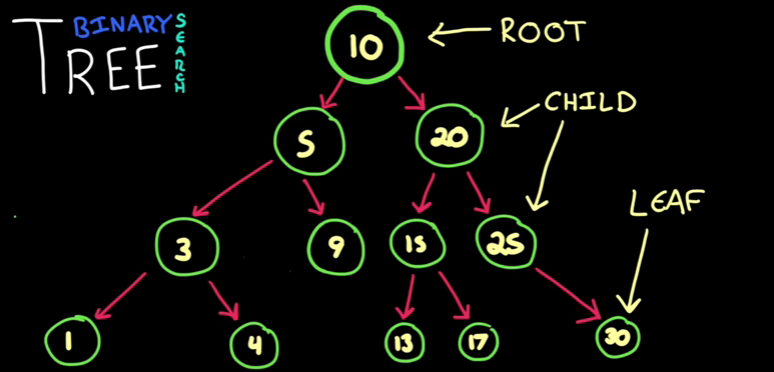
  • A tree will have a root node on its top and it has child and child have child. 
  • Node with out child are called leaf.
  • A Binary Tree contains nodes with two children always.Each node has left node and right node. 
  • Binary search tree is a binary tree having specific ordering. Here always left node contains lesser and right node contains higher values. This ordering will make finding a node very fast. 
  • Insertion: There are two types of insertion are there Balanced and Unbalanced 
    • Balanced Insertion
      • Inserts on next free child based on left right order and time complexity will be lesser here.
    • Unbalanced Insertion
      •  insert go deep of list and time complexity is higher. 
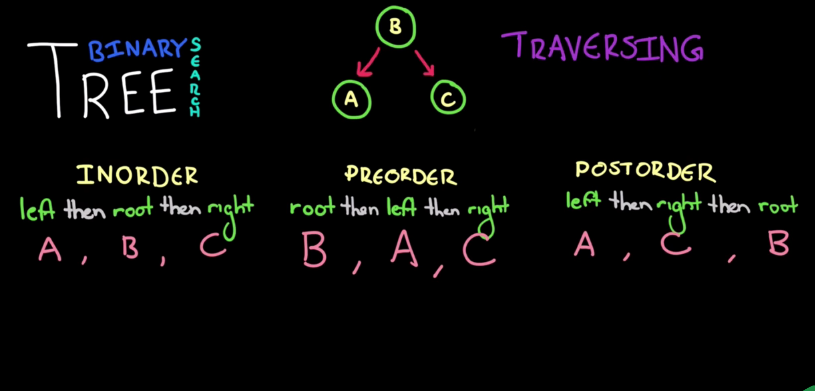
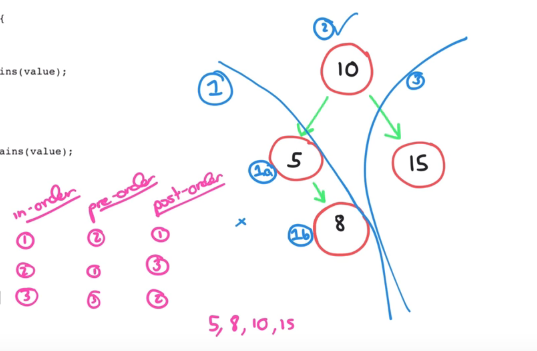
  •  Traversing 
    • In-order Traverse
      •  Visit left node first then root node and then right node
    •  Pre-order
      • Visit root node first then left node and right node.
    • Post-Order 
      • Visit left node first then right node and last root node. 
  •  Code approach 
    • For Insert 
      • Compare value with root value.
      •  If value lesser or equal to root value then go to left child node. Put value in child node if child node is null.
      • If child node not null then pass the value to insert method of child. 
      • If value is greater than root node value then do the same with right node. 
    • For Contains 
      • Check node value equals to value. 
      • If equals then return true. 
      • Else if value lesser than root value then go to left. If left node is null return false else call contains method of left node.
      • Else if value greater than root node value then go to right node and do the same there.

public class Node { int data; Node left; Node right; public Node(int data) { this.data = data; } public void insert(int value) { if (value <= data) { // inserting if left node is free if (left == null) { left = new Node(value); } else { // forward to next node if left node aleady occupied. left.insert(value); } } else { if (right == null) { right = new Node(value); } else { right.insert(value); } } } public boolean contains(int value) { if (data == value) { return true; } else if (value < data) { if (left == null) { return false; } else { left.contains(value); } } else { if (right == null) { return false; } else { right.contains(value); } } return false; } public void inOrderPrinting() { if (left != null) { left.inOrderPrinting(); } System.out.println(data); if (right != null) { right.inOrderPrinting(); } } }

Reference Link https://www.youtube.com/watch?v=oSWTXtMglKE

Wednesday, 20 September 2017


  • Bubble Sort is the simplest sorting algorithm that works by repeatedly swapping the adjacent elements if they are in wrong order. 
  •  Getting each element one by one and comparing it with adjacent elements and swapping the positions.

public void bubbleSort() { int temp, firstValue, secondValue; int[] arr = { 1, 90, 25, 22, 4, 50 }; printArray(arr); for (int i = 0; i < arr.length; i++) { // #arr.length - 2 -- avoids next index of last index -- secondValue for (int j = 0; j < arr.length - 2; j++) { firstValue = arr[j]; secondValue = arr[j + 1]; if ((firstValue > secondValue)) { temp = firstValue; arr[j] = secondValue; arr[j + 1] = temp; } } } System.out.println("-----SORTING DONE-----"); printArray(arr); }
 
Reference Link https://www.youtube.com/watch?v=T8ErAYobcbc matrix

A linear search traverse down a list, one item at a time, without jumping.
public String linearSearchForValue(int value) { String indexesWithValue = ""; for (int i = 0; i < size; i++) { if (theArray[i] == value) { indexesWithValue += i + " ,"; } } return indexesWithValue; }

A matrix will be in M x N format.So what we need to do is, get value of indexes from 0,0 to M,N. Itreate the two dimensional array in diagonally as follow
50 36 22 31 88 87 27 73 95
After diagonal traverse the output will be.
50 31 36 27 88 22 73 87 95
Consider the above output
50 31 36 27 88 22
  • These elements start from left to right top
  • Need to iterate for 0 to M-1 using for loop and display corresponding elements diagonally using a while loop.
  • To find next element use for formula: M-1,N+1 in while loop
73 87 95
  • These elements start from bottom to right top
  • Need to Iterate form 1 to N-1 in for loop and display corresponding elements diagonally using a while loop.
  • So to find next element use for formula, M-1,N+1 in while loop

      TraveseMatrixDiagonally.java  
public class TraveseMatrixDiagonally { private static final int M = 4; private static final int N = 4; public static void main(String[] args) { TraveseMatrixDiagonally app = new TraveseMatrixDiagonally(); int[][] matrix = app.createMatrix(); app.printMatrix(matrix); app.traverseDiagonally(matrix); } private void traverseDiagonally(int[][] matrix) { for (int i = 0; i <= M - 1; i++) { int X = i; // temp M int Y = 0; // temp N while (X >= 0 && Y <= N - 1) { System.out.print(matrix[X][Y] + " "); X = X - 1; Y = Y + 1; } System.out.println(" "); } for (int i = 1; i <= N - 1; i++) { int X = M - 1; int Y = i; while (X >= 0 && Y <= N - 1) { System.out.print(matrix[X][Y] + " "); X = X - 1; Y = Y + 1; } System.out.println(" "); } } private int[][] createMatrix() { int matrix[][] = new int[M][N]; for (int i = 0; i < M; i++) { for (int j = 0; j < N; j++) { matrix[i][j] = (int) ((Math.random() * (99 + 1 - 10)) + 10); } } return matrix; } private void printMatrix(int[][] matrix) { for (int i = 0; i < M; i++) { for (int j = 0; j < N; j++) { System.out.print(matrix[i][j]); System.out.print(" "); } System.out.println(" "); } } } /* ****** SAMPLE INPUT ******** 61 44 88 74 44 32 86 56 92 ******* INPUT ******** ****** SAMPLE OUTPUT ******** 61 74 44 86 44 88 56 32 92 ******* OUTPUT ******** */
Reference Link https://www.youtube.com/watch?v=T8ErAYobcbc

Tuesday, 19 September 2017

A matrix will be in M x N format.So what we need to do is, get value of indexes from 0,0 to m,n. Itreate the two dimensional array in spiral mode as follow
  • we need to traverse matrix and remove the row/column which already traversed.
  • We are not going to delete the elements instead we will limit it by defining boundaries. 
  • Boundaries can be t, b, l, r we need to specify the direction variable dir. It decides the direction of traverse as below.
  • dir=0; ->right, dir=1 -> down, dir=2 -> left, dir=3 ->up

      TraverseMatrixSpiral.java  
package com.sk.iwq.matrix; public class TraverseMatrixSpiral { private static final int M = 3; private static final int N = 3; public static void main(String[] args) { TraverseMatrixSpiral app = new TraverseMatrixSpiral(); int matrix[][] = app.createMatrix(); app.printMatrix(matrix); System.out.println(app.traverseSpriral(matrix).toString()); } private StringBuilder traverseSpriral(int[][] matrix) { StringBuilder sb = new StringBuilder(); int dir = 0; int t = 0; int b = M - 1; int l = 0; int r = N - 1; while (t <= b && l <= r) { if (dir == 0) { for (int i = l; i <= r; i++) { sb.append(matrix[t][i] + ", "); } t++; } if (dir == 1) { for (int i = t; i <= b; i++) { sb.append(matrix[i][r] + ", "); } r--; } if (dir == 2) { for (int i = r; i >= l; i--) { sb.append(matrix[b][i] + ", "); } b--; } if (dir == 3) { for (int i = b; i <= t; i++) { sb.append(matrix[i][l] + ", "); } l++; } dir = (dir + 1) % 4; } return sb; } private int[][] createMatrix() { int matrix[][] = new int[M][N]; for (int i = 0; i < M; i++) { for (int j = 0; j < N; j++) { matrix[i][j] = (int) (Math.random() * 100 + 1); } } return matrix; } private void printMatrix(int[][] matrix) { for (int i = 0; i < M; i++) { for (int j = 0; j < N; j++) { System.out.print(matrix[i][j]); System.out.print(" "); } System.out.println(" "); } } } /* ****** SAMPLE INPUT ******** 50 36 22 31 88 87 27 73 95 ******* INPUT ******** ****** SAMPLE OUTPUT ******** 50, 36, 22, 87, 95, 73, 27, 31, 88 ******* OUTPUT ******** */

Search This Blog

Contact us

Name

Email *

Message *